Every time you click a link or enter a URL, your software sends a request to a server. Included in that request is a User Agent String, a line of text that tells the server:
- What browser you are using (Chrome, Firefox, Safari).
- What operating system you have (Windows 11, macOS, Android).
- What device type you are on (Mobile, Tablet, Desktop).
Example of a user agent
Mozilla/5.0 (Windows NT 10.0; Win64; x64) AppleWebKit/537.36 (KHTML, like Gecko) Chrome/120.0.0.0 Safari/537.36| Component | Meaning |
| Mozilla/5.0 | Historical tag indicating the browser is “Mozilla compatible.” |
| Windows NT 10.0 | The user is on Windows 10 or 11. |
| AppleWebKit | The “engine” used to render the web pages. |
| Chrome/120.0 | The actual browser name and its specific version. |
What’s an Empty User Agent?
An empty user agent occurs when a web request is sent to a server with the “User-Agent” header either completely missing or intentionally left blank
If you are running a website and you see “Empty User Agent” in your logs, 99.9% of the time it is a bot you don’t want.
Why would a human on this earth want to check those files?
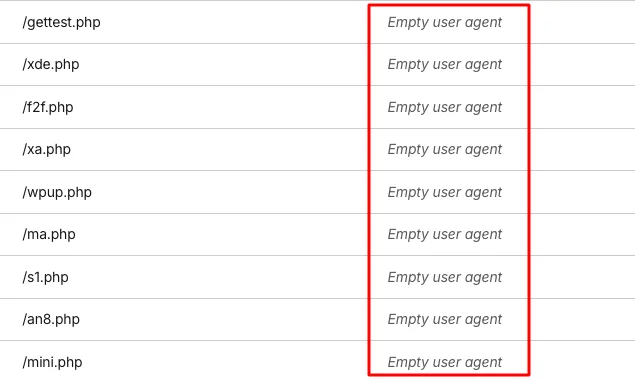
You can target those requests with the following rule
(http.user_agent eq "")You can either block or challenge those requests
I’ve found that Cloudflare’s managed challenges usually catch these, but they aren’t foolproof against more sophisticated tools.
Since these requests are almost certainly bots, I’d recommend setting up a hard block to be safe

Manuel Campos
I'm a WordPress enthusiast. I document my journey and provide actionable insights to help you navigate the ever-evolving world of WordPress."